Mastering Distributed Workflows: A Step-by-Step Guide to Cloudflare Workflows V2
Introduction
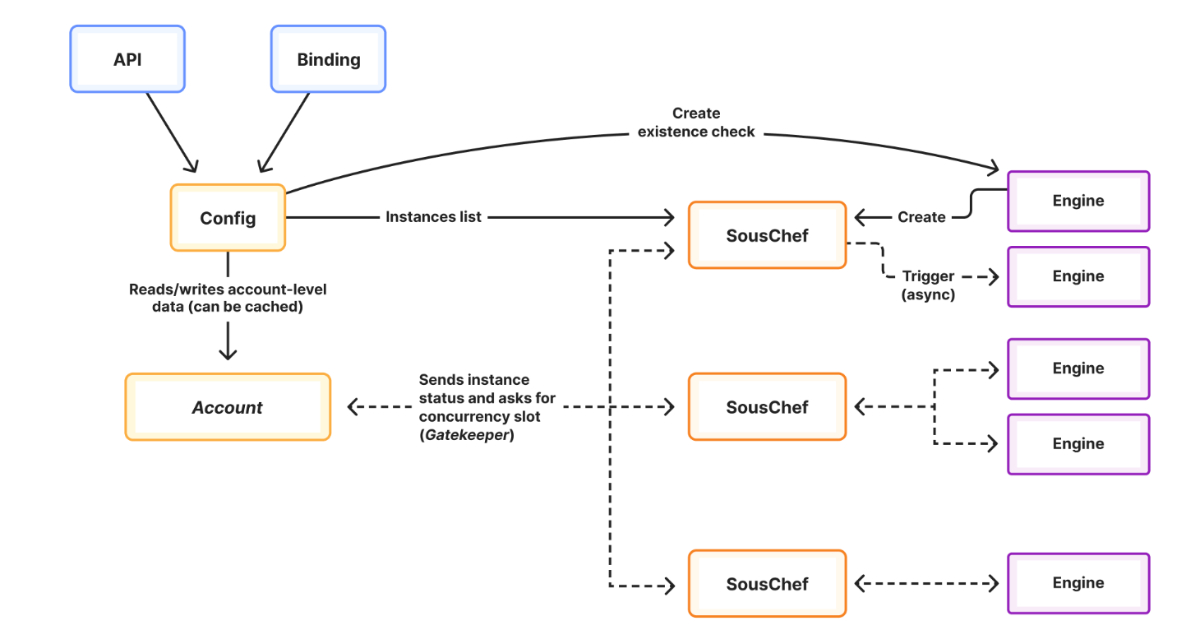
Cloudflare Workflows V2 revolutionizes distributed workflow orchestration by introducing deterministic replayable execution, enhanced observability, and massive scalability—supporting up to 50,000 concurrent instances and 2 million queued workflows. Whether you're managing AI agents, data pipelines, or background processing tasks, this guide will walk you through setting up and optimizing your workflows using the new V2 features. By the end, you'll understand how to leverage deterministic execution for reliability and scale your operations efficiently across distributed systems.
What You Need
- A Cloudflare account (free or paid tier that supports Workers/Workflows)
- Node.js and npm installed for local development
- Basic familiarity with JavaScript/TypeScript and async programming
- Cloudflare CLI (
wrangler) installed and configured - A code editor (e.g., VS Code)
- Access to the Cloudflare Dashboard for monitoring
Step-by-Step Instructions
Step 1: Set Up Your Cloudflare Environment
Begin by logging into your Cloudflare account. Navigate to the Workers & Pages section and enable Workflows if it's not already activated. Install the latest version of Wrangler CLI:
npm install -g wrangler@latestAuthenticate your terminal session with wrangler login. This connects your local development environment to Cloudflare's edge network, allowing you to deploy workflows directly.
Step 2: Create a New Workflow Project
Initialize a new project using the Workflows template. Run:
wrangler init my-workflow --template workflowsThis scaffold includes the necessary files: wrangler.toml for configuration, src/workflow.js for your workflow logic, and src/worker.js for the entry point. The template automatically sets up the Workflows binding—check that [[workflows]] is present in your wrangler.toml.
Step 3: Define Your Workflow with Deterministic Steps
Open src/workflow.js. In V2, each step must be deterministic—meaning it produces the same output given the same input, enabling replayable execution. Use the WorkflowEntrypoint class and define an async run(event, ctx) method. For example:
export default class MyWorkflow extends WorkflowEntrypoint {
  async run(event, ctx) {
    const step1 = await ctx.do("fetchData", async () => {
      // Deterministic: use external API but cache results
      return await fetch("https://api.example.com/data", { cache: "force-cache" });
    });
    const step2 = await ctx.do("process", async (prev) => {
      // Pure transformation, no side effects
      return prev.data.map(item => item * 2);
    }, step1);
    await ctx.do("store", async (processed) => {
      // Idempotent write to KV
      await env.KV.put("result", JSON.stringify(processed));
    }, step2);
    return "done";
  }
}
Each ctx.do call is a workflow step. Ensure steps do not rely on mutable global state or non-deterministic functions (e.g., Date.now(), Math.random). Use the event parameter for input data that triggers the workflow.
Step 4: Implement Deterministic Replayable Execution
To make your workflow fully replayable, avoid side effects inside step functions that cannot be rolled back. Instead, use Cloudflare's built-in primitives like KV, D1, or Queues within steps, ensuring writes are idempotent. V2 automatically records step outputs and allows replaying from any point if a step fails. Test replayability by intentionally causing a failure and observing that the workflow resumes from the last successful step without reprocessing earlier steps.
/presentations/game-vr-flat-screens/en/smallimage/thumbnail-1775637585504.jpg)
Step 5: Scale Up to 50,000 Concurrent Instances
V2 supports massive parallelism. To take advantage, design your workflow to be stateless and split work into independent branches. Use ctx.sleep for delays instead of blocking. Configure concurrency limits in wrangler.toml under [workflows.concurrency]:
concurrency = 50000 // maximum concurrent instancesFor queueing up to 2 million workflows, use the Workflows API to enqueue instances asynchronously. Each instance runs independently, scaling horizontally across Cloudflare's global network.
Step 6: Enhance Observability and Monitoring
V2 adds detailed logs and metrics. In the Cloudflare Dashboard, go to Workflows and select your deployment. View real-time instance counts, step durations, failure rates, and replay events. Customize logging within your workflow:
ctx.log("Processing step 1", { instanceId: event.instanceId });These logs are automatically correlated with trace IDs. Enable alerts for unusual patterns (e.g., high failure rates) via the Cloudflare Observability suite.
Step 7: Deploy and Test Your Workflow
Deploy with wrangler deploy. Trigger a test workflow by sending an HTTP request to your worker endpoint, which invokes the workflow via env.MY_WORKFLOW.create({...}). Check the Dashboard for the workflow instance status. Simulate failures by throwing errors in steps and verify that the workflow replays correctly—V2 will automatically retry from the last successful checkpoint.
Tips for Success
- Keep steps small and pure: Break complex logic into multiple simple steps to make debugging and replay easier.
- Use idempotency keys: For external API calls, include an idempotency header to prevent duplicate side effects during replays.
- Monitor concurrency limits: While V2 supports 50k concurrent instances, ensure your downstream services can handle that load.
- Leverage Queues for large backlogs: The 2M queued workflow capacity is perfect for batch processing; use Cloudflare Queues to buffer triggers.
- Version your workflows: When updating a live workflow, create a new version in the dashboard to keep existing runs intact.
- Test determinism: Write unit tests that run your workflow steps multiple times with the same input and verify identical outputs.
By following these steps, you can build highly reliable, scalable distributed workflows using Cloudflare Workflows V2. The combination of deterministic replayable execution, improved observability, and massive concurrency makes it a powerful tool for modern cloud-native applications.